How to Retarget Shopify Visitors Who Didn't Buy
The complete Shopify retargeting and tracking setup broken down by layer, tool, and budget so you know exactly what to install, when to install it, and what problem each tool solves.


Most Shopify store owners think about retargeting as something that happens in their ad account. You run ads, people visit, you retarget them with more ads. What most do not realise is that the quality of your retargeting is entirely dependent on the quality of your tracking. If your pixels are not firing correctly, if your user journeys are not being stitched together across sessions and devices, if your Klaviyo flows are not seeing the right events, then your retargeting audiences are incomplete, your ad spend is optimising against bad data, and you are paying to re-advertise to a fraction of the visitors who should be in your retargeting pool.
This article teaches you how to fix that at every level. Before you read any further, one important piece of groundwork. If you are running email marketing and your traffic sources in GA4 look messy or you have a large direct traffic number that does not make sense, UTM tracking is likely the problem. We put together a full guide on how to set up UTM parameters correctly in your email marketing. [INSERT UTM ARTICLE LINK] Get that right before anything else in this article will work properly.
01The complete system overview
Before we go into each layer, here is the full picture of what a complete retargeting and tracking system looks like and what it costs at each stage. Every layer has a job. Together they form a system where no visitor falls through the gap.
The system has four layers:
Layer 1: Pixel tracking
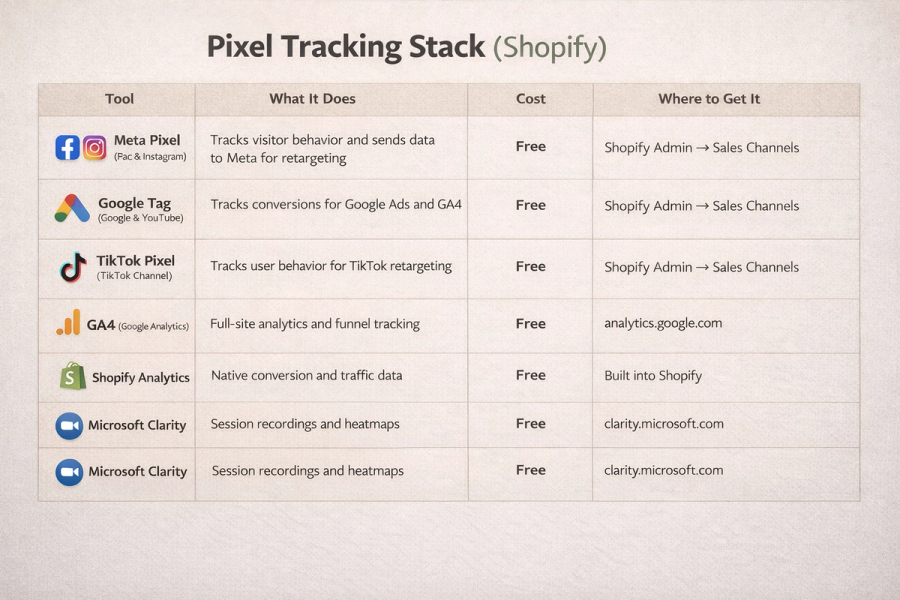
Your pixels fire on your store and send visitor behavior data to ad platforms so you can retarget visitors with paid ads. This is the foundation. Free using Shopify's native integrations.
Layer 2: Server-side tracking
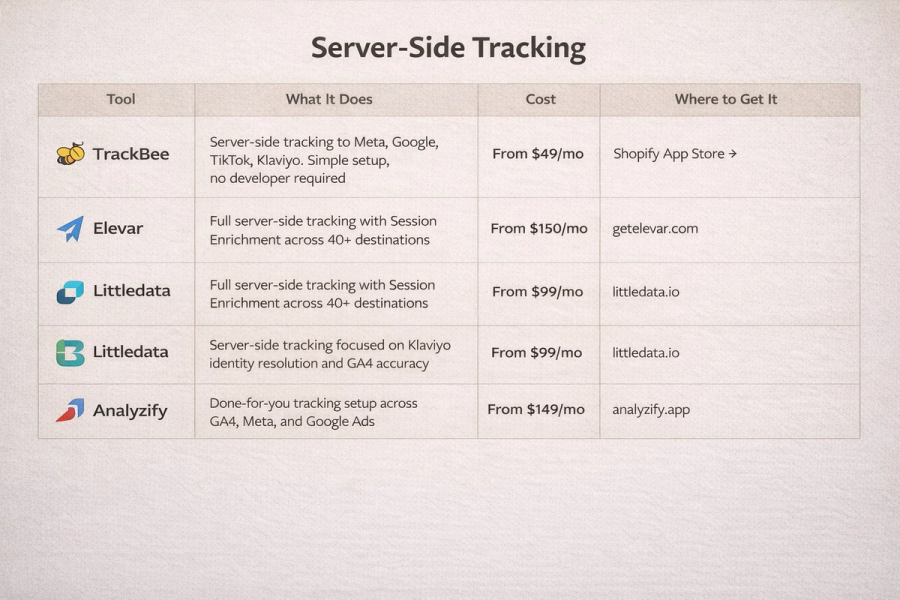
A server-side layer runs alongside your pixels and sends conversion data directly to ad platforms through their APIs, bypassing browser restrictions and ad blockers. This fills the 20 to 40 percent of conversions that browser pixels miss. Costs from $49 per month.
Layer 3: Email and SMS retargeting
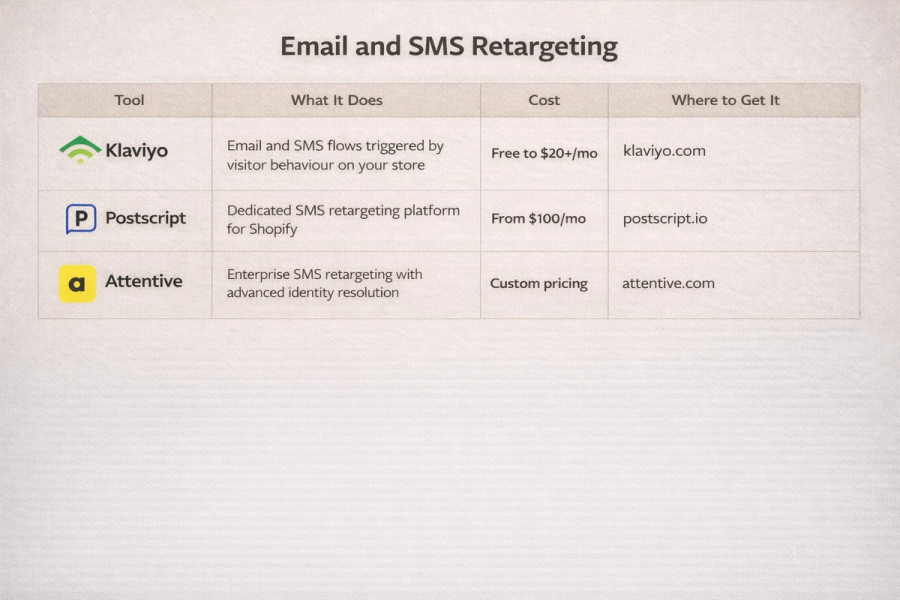
Klaviyo captures visitor behavior on your store and triggers automated email and SMS sequences based on what each visitor did. This is your retargeting system for visitors who are already on your list. Free up to 250 contacts, from $20 per month after that.
Layer 4: Attribution
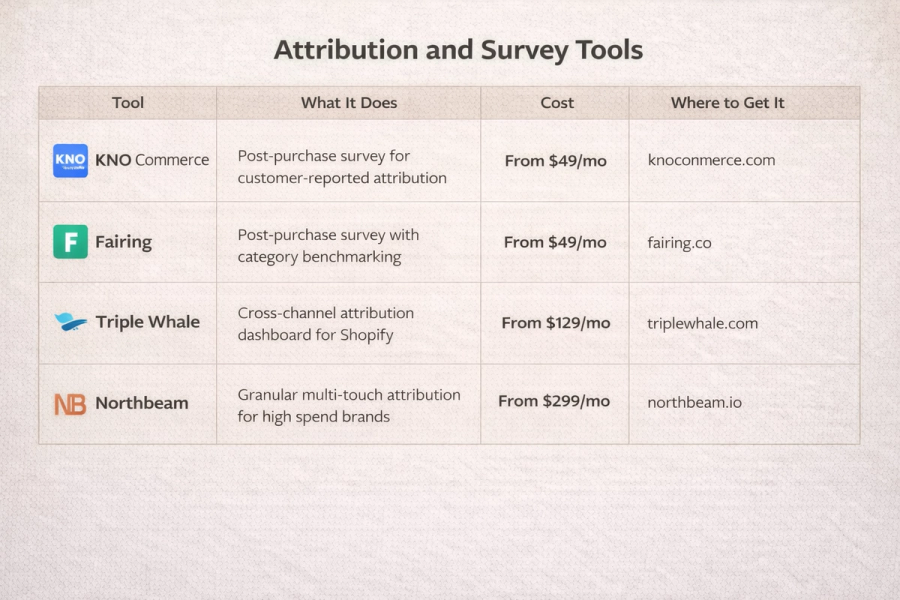
Analytics and attribution tools tell you which channels, campaigns, and creatives are actually driving revenue so you know where your retargeting is working and where it is not. Free with GA4, from $49 per month for post-purchase surveys, from $129 per month for dedicated attribution platforms.
02Layer 1: Pixel tracking
The free foundation every store needs
This is where everything starts. Before you spend a dollar on any paid tracking tool you need your native pixels connected and verified. Shopify gives you direct integrations with Meta, Google, and TikTok that install both the browser pixel and the server-side Conversions API connection simultaneously. Free to set up. Non-negotiable for every store.
What you are tracking and why
Every pixel tracks the same core events. These events are what you use to build retargeting audiences in each ad platform.
- Page view: visitor landed on your store
- View content: visitor viewed a specific product page
- Add to cart: visitor added a product to their cart
- Initiate checkout: visitor started the checkout process
- Purchase: visitor completed an order
The further down this list a visitor gets without purchasing the more valuable they are as a retargeting audience. A visitor who initiated checkout is the highest-intent audience you can build. They chose your product, entered checkout, and something stopped them. A retargeting ad to that audience will convert at a significantly higher rate than any cold audience.
Meta pixel — Facebook and Instagram sales channel
The most important pixel to get right because Meta is where the majority of Shopify stores spend the most ad budget.
How to set it up:
- In your Shopify admin go to Sales Channels and add Facebook and Instagram
- Connect your Facebook Business account and select your Meta pixel
- Shopify installs the browser pixel and Conversions API simultaneously
- Go to Meta Events Manager and use Test Events to verify PageView, ViewContent, AddToCart, InitiateCheckout, and Purchase are all firing
- Enable Advanced Matching in the integration settings — this sends hashed customer data with each event and improves your audience match rate by 10 to 25 percent
Cost: Free Where to get it: Shopify admin — Sales Channels — Facebook and Instagram Direct link: https://www.facebook.com/business/tools/meta-pixel
Google Analytics 4 and Google Ads — Google and YouTube sales channel
Tracks conversions for Google Ads and sends clean purchase data into GA4 for analytics.
How to set it up:
- In your Shopify admin go to Sales Channels and add Google and YouTube
- Connect your Google account and GA4 property
- Shopify installs the Google tag and configures enhanced conversions automatically
- In Google Ads go to Tools and Settings then Measurement then Conversions
- Create Purchase as your primary conversion, Add to Cart and Begin Checkout as secondary
- Set Purchase as the action Google optimises toward
Cost: Free Where to get it: Shopify admin — Sales Channels — Google and YouTube Direct link: https://analytics.google.com
TikTok pixel — TikTok sales channel
Tracks visitor behaviour for TikTok retargeting audiences and campaign optimisation.
How to set it up:
- In your Shopify admin go to Sales Channels and add TikTok
- Connect your TikTok Business account and pixel
- Enable Events API alongside the browser pixel for server-side backup
- Verify ViewContent, AddToCart, InitiateCheckout, and CompletePayment are firing in TikTok Events Manager
Cost: Free Where to get it: Shopify admin — Sales Channels — TikTok Direct link: https://ads.tiktok.com
Microsoft Clarity
Free session recording and heatmap tool that also acts as a behaviour layer on top of your pixel tracking. Shows you what visitors actually do on the pages your pixels report drop-off on.
Cost: Free, no session limits Where to get it: https://clarity.microsoft.com
Shopify Analytics
Built-in dashboard showing conversion rate by traffic source, sessions to checkout to purchase funnel, and real-time sales data. Use it for daily health checks alongside GA4.
Cost: Free, included with every Shopify plan Where to get it: Built into your Shopify admin
What the free setup misses
The native Shopify pixel integrations give every store a solid foundation but browser-based tracking has significant gaps that grow more expensive as your ad spend increases. iOS App Tracking Transparency limits what the browser pixel captures from iPhone users. Safari caps cookies at seven days. Ad blockers prevent pixels from firing for a segment of visitors. Industry estimates suggest browser-only tracking misses between 20 and 40 percent of conversion events. For a store spending $10,000 per month on paid media that is a meaningful amount of ad spend optimising against incomplete data. That is what Layer 2 fixes.
03Layer 2: Server-side tracking
Closing the gap browser pixels leave
Server-side tracking sends conversion data directly from your store's server to ad platforms through their APIs rather than relying on the visitor's browser. It bypasses iOS restrictions, ad blockers, and cookie limitations entirely. The result is more conversions attributed in your ad platforms, better ad algorithm optimization, more visitors in your retargeting audiences, and Klaviyo flows that trigger for more of the visitors they are designed to reach. Most stores that install server-side tracking see 10 to 20 percent more purchases attributed in Meta and GA4 within the first two weeks.
TrackBee
TrackBee captures all key funnel events server-side and sends them to Meta, Google Ads, TikTok, Pinterest, and Klaviyo automatically. Five-minute setup, no developer required. Adds session enrichment to build persistent shopper profiles that help ad platforms optimise better over time.
Why brands use it: The most accessible server-side upgrade for stores that want meaningful improvement in attribution and Klaviyo flow performance without technical complexity. Brands typically see two to three times more Klaviyo abandoned cart flow revenue within the first two weeks.
Who it is for: Stores doing $500K to $2M in revenue spending on paid ads who want to close their tracking gap without a developer or ongoing maintenance.
Pricing:
- Starter: from $49 per month
- Growth: from $99 per month
- Scale: from $199 per month
- Free trial available on all plans
Where to get it: https://www.trackbee.io or Shopify App Store
Elevar
Elevar sits between your Shopify store and your marketing platforms and sends conversion data server-side to Meta CAPI, Google Ads, GA4, TikTok, Klaviyo, and 40 plus other destinations. The standout feature is Session Enrichment which stitches events across sessions and devices to recognise the same visitor whether they clicked your ad on Monday and purchased via email on Wednesday. Used by Vuori, SKIMS, and Rothy's among thousands of other DTC brands.
Why brands use it: At a certain level of ad spend the tracking gaps in browser-only pixels become too expensive to ignore. A store spending $50,000 per month on paid media that is missing 20 percent of conversions is spending $10,000 per month optimising against incomplete data. Elevar closes that gap and typically pays for itself many times over.
Who it is for: Stores doing $2M or more in revenue running paid media across multiple channels. The industry standard for brands serious about tracking.
Pricing:
- Base plan: from $150 per month
- Growth plan: from $250 per month
- Enterprise: custom pricing
- 15-day free trial, 30-day money-back guarantee
Where to get it: https://getelevar.com or Shopify App Store
Littledata
Littledata focuses specifically on accurate GA4 ecommerce tracking and enhanced Klaviyo identity resolution. Uses a server-side device graph and persistent user IDs to connect visitor browsing behaviour to Klaviyo profiles even when they arrive from a non-Klaviyo source. Best-in-class for subscription tracking and Klaviyo flow performance.
Why brands use it: Brands running subscriptions use it because it is the only solution that accurately captures recurring order revenue in GA4. Brands with underperforming Klaviyo flows use it because the identity resolution drives a 40 percent or greater uplift in flow revenue.
Who it is for: Stores doing $1M or more with a subscription component or a Klaviyo programme underperforming relative to expectations. Often used alongside Elevar at the $5M-plus level.
Pricing:
- Starter: $99 per month — up to 1,000 orders per month
- Growth: $249 per month — up to 5,000 orders per month
- Enterprise: custom pricing
- 30-day free trial
Where to get it: https://www.littledata.io or Shopify App Store
Analyzify
Analyzify handles the complete setup of GA4 ecommerce tracking, Meta CAPI, and Google Ads conversion tracking on your store and then monitors it on an ongoing basis. A managed service rather than a self-serve tool. If your tracking is broken and you do not have the technical resource to fix it, Analyzify fixes it and keeps it fixed.
Why brands use it: Fixing Shopify tracking correctly is genuinely complex. Analyzify removes the problem entirely for stores without a developer or in-house technical resource.
Who it is for: Stores at any revenue level that know their tracking is broken and want it fixed without managing it themselves.
Pricing:
- One-time setup: from $749
- Monthly monitoring: from $149 per month
- Full managed service: custom pricing
Where to get it: https://analyzify.app
04Layer 3: Email and SMS retargeting
Your highest-return retargeting channel
Paid retargeting costs you every time someone sees your ad whether they click or not. Email and SMS retargeting costs almost nothing per send and reaches people who have already given you permission to contact them. The cost per recovered sale through email is a fraction of the cost per sale through paid retargeting. This layer is consistently the highest-return channel in any Shopify store's stack. But it only works at full capacity when your email platform is correctly identifying visitors and triggering the right flows at the right moment.
Klaviyo
Klaviyo connects to your Shopify store and triggers automated email and SMS sequences based on what each visitor does. Browse abandonment, add to cart abandonment, checkout abandonment, post-purchase, and win-back flows all run automatically in the background recovering revenue that would otherwise be permanently lost.
Why brands use it: The abandoned cart flow alone recovers five to fifteen percent of abandoned carts automatically. There is no revenue level at which this is not worth setting up.
Who it is for: Every Shopify store from day one. Non-negotiable.
Pricing:
- Free: up to 250 contacts, 500 email sends per month
- Email: from $20 per month, scales with list size
- Email and SMS: from $35 per month
- All pricing scales automatically with list size
Where to get it: https://www.klaviyo.com or Shopify App Store
Postscript
Postscript is SMS-only and goes deeper on compliance, two-way conversation capability, and Shopify data integration than Klaviyo's SMS offering. Triggers the same abandonment and post-purchase flows as Klaviyo but through text message, reaching customers in a different context with significantly higher open rates.
Why brands use it: Brands add Postscript when their email programme is performing well and they want SMS as a second independent recovery channel that captures a different segment of visitors.
Who it is for: Stores doing $1M or more with Klaviyo working well who want to build SMS as a dedicated parallel channel.
Pricing:
- Starter: $100 per month includes $100 in SMS credits
- Growth: $500 per month includes $500 in SMS credits with dedicated support
- Enterprise: custom pricing
Where to get it: https://www.postscript.io or Shopify App Store
Attentive
Enterprise SMS and email platform with advanced identity resolution that identifies more site visitors and connects their behaviour to profiles with greater accuracy than most tools in this category. Built for brands where SMS is a primary revenue channel rather than a supplementary one.
Why brands use it: Enterprise DTC brands use Attentive when they need SMS to perform at the same level as their paid media and email channels with the same rigour around data accuracy and audience building.
Who it is for: Stores doing $10M or more with a serious SMS programme and a team to manage it.
Pricing: Custom pricing based on contact and message volume.
Where to get it: https://www.attentive.com
05Layer 4: Attribution
Knowing which retargeting is actually working
Once your pixels are firing, server-side tracking is running, and Klaviyo flows are live, attribution tells you which channels, campaigns, and creatives are actually driving revenue. Without this layer you are running retargeting blind. Spending budget without being able to tell what is working and what is not.
KNO Commerce
KNO adds a one to two question survey to your Shopify thank you page immediately after purchase asking customers how they found your store. Pixels report what they can see. KNO captures what customers actually remember, filling the attribution gaps no tracking tool can close including word of mouth, podcast, organic social, and influencer content without tracked links.
Why brands use it: It answers the question no tracking tool can answer. What actually made this person decide to buy. Essential for brands spending on untracked channels or with a large unexplained direct traffic segment in GA4.
Who it is for: Any store doing over $500K in revenue that wants attribution data beyond what pixels report.
Pricing:
- Starter: $49 per month — up to 500 responses
- Growth: $149 per month — up to 2,000 responses
- Pro: $249 per month — up to 5,000 responses
Where to get it: https://www.knocommerce.com or Shopify App Store
Fairing
Post-purchase survey tool with category benchmarking that shows how your customer-reported attribution compares to other brands in your space. Supports advanced question logic so follow-up questions can be asked based on each customer's initial answer.
Why brands use it: Fairing gives post-purchase attribution data with the added context of where you stand relative to competitors in the same category, helping identify which channels are underinvested.
Who it is for: Stores doing $1M or more that want customer-reported attribution with competitive benchmarking context.
Pricing:
- Starter: $49 per month — up to 500 responses
- Growth: $149 per month — up to 2,000 responses
- Pro: $249 per month — up to 5,000 responses
Where to get it: https://www.fairing.co
Triple Whale
Triple Whale pulls data from Meta, Google Ads, TikTok, Klaviyo, and Shopify into one dashboard with first-party attribution. Shows blended ROAS across all channels, customer LTV by acquisition source, creative-level performance, and real-time profit after ad spend and cost of goods.
Why brands use it: Looking at Meta Ads Manager, Google Ads, and TikTok separately gives you a fragmented and often contradictory view of performance. Triple Whale unifies those views into one reliable number. The standard tool for founder-led DTC brands making daily budget decisions.
Who it is for: Stores doing $1M or more running paid media across two or more channels.
Pricing:
- Free: Founders Dashboard with core metrics
- Growth: from $129 per month — full attribution, creative analytics, AI insights
- Pro: from $279 per month — advanced forecasting, custom dashboards
- Enterprise: custom pricing
Where to get it: https://www.triplewhale.com or Shopify App Store
Northbeam
Northbeam is multi-touch attribution built for performance marketing teams running structured attribution programmes at scale. Captures every customer touchpoint across paid and organic channels and applies multi-touch models to show exactly which combination of interactions drove each conversion. Includes media mix modelling to forecast how spend allocation changes will affect revenue.
Why brands use it: At $100,000 per month in paid media, understanding the true contribution of each channel at a granular level is worth more than the tool costs. Used when Triple Whale is not granular enough.
Who it is for: Stores doing $5M or more with a dedicated performance marketing team and significant multi-channel paid budgets. Often run alongside Triple Whale rather than instead of it.
Pricing:
- Starter: from $299 per month — up to $1M monthly ad spend
- Growth: from $599 per month — up to $3M monthly ad spend
- Enterprise: custom pricing
Where to get it: https://www.northbeam.io
06Pre-built stacks by budget and store size
Stack 1: The Bootstrapper
For stores under $500K revenue with minimal or no ad spend
You are in the early stages. Traffic is building, you may be running some ads, and you cannot justify paid tracking infrastructure yet. This stack costs nothing and gives you everything you need to understand what is happening on your store and start recovering lost revenue automatically.
What you need and why:
Meta pixel via Facebook and Instagram sales channel — Free
Your retargeting foundation on the most important paid channel for most Shopify stores. Connect it now so you are building audience data even before you run a single retargeting campaign. The audience you build today is the audience you retarget in three months. Where to get it: Shopify admin — Sales Channels Link: https://www.facebook.com/business/tools/meta-pixel
Google Analytics 4 via Google and YouTube sales channel — Free
Your baseline analytics layer. Tells you where traffic comes from, which pages visitors drop off on, and what your conversion funnel looks like from session to purchase. Non-negotiable before any other tool makes sense. Where to get it: Shopify admin — Sales Channels Link: https://analytics.google.com
TikTok pixel via TikTok sales channel — Free
Even if you are not running TikTok ads yet, install the pixel now. You need a minimum amount of data in the platform before TikTok's algorithm can optimise. Starting early means when you do run ads you already have audience data to work with. Where to get it: Shopify admin — Sales Channels Link: https://ads.tiktok.com
Microsoft Clarity — Free
Free unlimited session recordings and heatmaps. Install it the same day as your pixels. Watch ten recordings on your product page this week and you will know more about what is wrong with your conversion rate than any tool report will tell you. Where to get it: https://clarity.microsoft.com
Shopify Analytics — Free
Built into your admin. Use it for quick daily checks on conversion rate, traffic sources, and top-selling products. Not detailed enough for CRO decisions on its own but always on and requires no setup. Where to get it: Built into Shopify admin
Klaviyo — Free up to 250 contacts
Set up the abandoned cart flow within the first week of installing Klaviyo. A three-email sequence at one hour, twenty-four hours, and seventy-two hours after abandonment will recover a meaningful percentage of visitors who were close to buying. This is the single highest-return action you can take at this stage. Where to get it: https://www.klaviyo.com
Monthly cost: $0
Where to start: Connect all pixels first and verify every event is firing before running a single ad. Then set up Klaviyo and build the abandoned cart flow. These two actions give you basic retargeting capability and email recovery at zero cost. Do not upgrade to paid tracking tools until your ad spend is large enough that missing 20 to 30 percent of conversions costs more than the tool costs to fix it.
Stack 2: The Growing Brand
For stores doing $500K to $2M revenue spending on Meta and Google
You are spending on paid ads, traffic is consistent, and your conversion rate is not keeping pace with your spend. The gaps in your browser-only pixel tracking are becoming expensive. This stack closes the most critical tracking gaps and gets your Klaviyo flows working harder without a large monthly overhead.
What you need and why:
Meta pixel plus Conversions API via Shopify native — Free
You should already have this from Stack 1. If you do not, it is the first thing to fix. Verify all five events are firing correctly in Meta Events Manager before anything else. Where to get it: Shopify admin — Sales Channels Link: https://www.facebook.com/business/tools/meta-pixel
Google and YouTube channel with enhanced conversions — Free
Again this should already be running. If GA4 purchase numbers do not match your Shopify order numbers your tracking is broken and needs fixing before you add anything on top. Where to get it: Shopify admin — Sales Channels Link: https://analytics.google.com
Microsoft Clarity — Free
Keep this running at all times. It is free and gives you continuous session recording data on every page of your store. Where to get it: https://clarity.microsoft.com
TrackBee — from $49 per month
This is the priority upgrade at this stage. TrackBee adds server-side tracking to your existing pixels, sending conversion data directly to Meta, Google, TikTok, and Klaviyo through their APIs rather than relying on the browser. If you are spending $3,000 or more per month on paid ads and your browser pixel is missing 20 to 30 percent of conversions, TrackBee closes that gap quickly. Most brands see improved Klaviyo flow revenue within the first two weeks. Where to get it: https://www.trackbee.io or Shopify App Store
Klaviyo email and SMS — from $35 per month
At this stage your Klaviyo flows should be fully built out. Not just abandoned cart. Browse abandonment, checkout abandonment, post-purchase, and win-back all need to be running. If any of these are missing you are leaving recoverable revenue on the table every day. Where to get it: https://www.klaviyo.com
KNO Commerce — from $49 per month
Add a post-purchase survey to your thank you page now. You are spending on multiple channels and you need to know which ones are actually driving purchases beyond what your pixels report. KNO gives you that data directly from your customers at the moment of purchase. Where to get it: https://www.knocommerce.com or Shopify App Store
Where to start: TrackBee first. The improved conversion signal quality flowing into Meta and Google will improve your ad performance within two weeks and the Klaviyo flow uplift pays for the tool cost many times over. Then make sure all five Klaviyo flows are live. Then add KNO to start building your customer-reported attribution picture alongside your pixel data.
Stack 3: The Scaling Store
For stores doing $2M to $5M revenue running paid across multiple channels
You are spending meaningfully on Meta, Google, and likely TikTok. You have a real Klaviyo programme but it is probably underperforming what it should be generating. You need full server-side coverage, accurate multi-channel attribution, and complete Klaviyo flow trigger coverage across all visitor types. This is the stack where tracking infrastructure starts making a significant difference to revenue.
What you need and why:
Meta, Google, and TikTok pixels via Shopify native — Free
All three should be running with Conversions API enabled on Meta and Events API enabled on TikTok. Verify all events are firing correctly before moving to paid tracking tools. Where to get it: Shopify admin — Sales Channels
Elevar — from $150 per month
This is the critical upgrade at this level. Elevar replaces TrackBee as your server-side tracking solution and adds Session Enrichment, which stitches visitor journeys across sessions and devices. When you are spending $15,000 or more per month on paid media, a 10 to 20 percent improvement in attributed conversions is meaningful revenue. Elevar also boosts Klaviyo flow performance by two to three times by capturing more product view and add to cart events server-side. Where to get it: https://getelevar.com or Shopify App Store
Klaviyo full flow suite — from $150 per month estimated
At this revenue level all five core flows need to be running and actively monitored. Browse abandonment, add to cart abandonment, checkout abandonment, post-purchase, and win-back. Review flow performance monthly and optimise the weakest performing sequence first. Your email programme should be generating 20 to 30 percent of total revenue at this stage. Where to get it: https://www.klaviyo.com
Triple Whale — from $129 per month
You are running paid across multiple channels and you need one place to see what each channel is actually contributing to revenue. Triple Whale unifies Meta, Google, TikTok, and Klaviyo data into one dashboard with first-party attribution. Use it to make daily budget decisions and identify which retargeting campaigns are driving the highest-quality customers not just the most clicks. Where to get it: https://www.triplewhale.com or Shopify App Store
KNO Commerce — from $49 per month
Keep this running. At this revenue level you are almost certainly spending on channels that pixel tracking underreports. KNO gives you the customer-reported data to cross-reference against your Triple Whale attribution and identify where your tracking is still missing conversions. Where to get it: https://www.knocommerce.com or Shopify App Store
Lucky Orange — $32 per month
Session recordings should still be a weekly habit even at this revenue level. Filter for visitors who spent more than two minutes on your product page without converting and watch ten recordings every week. Your product page optimisation decisions should be driven by what you see in recordings, not by what you think might be wrong. Where to get it: https://clarity.microsoft.com or https://www.luckyorange.com
Monthly cost: approximately $478 to $510 per month
Where to start: Elevar first. The server-side tracking and Session Enrichment upgrade is the most impactful single change you can make at this revenue level. Your ad platform performance will improve as the algorithms get better data. Your Klaviyo flows will trigger for more visitors. And your attribution reporting will be more accurate. Then make sure Triple Whale is giving you a clean cross-channel view before making any budget allocation decisions.
Stack 4: The Performance Brand
For stores doing $5M to $15M revenue with a dedicated marketing team
You have a team, meaningful multi-channel ad spend, and CRO is an ongoing operational function. Your tracking infrastructure needs to be airtight because at this spend level every gap in your data costs you real money. This stack gives you complete first-party data coverage, identity resolution across devices and sessions, and the attribution clarity to make confident budget decisions across every channel.
What you need and why:
Meta, Google, and TikTok pixels via Shopify native — Free
Still the foundation. All events verified, advanced matching enabled on Meta, Events API enabled on TikTok. Where to get it: Shopify admin — Sales Channels
Elevar — from $250 per month
Full server-side tracking with Session Enrichment across all your paid channels and Klaviyo. At this level you should be on the Growth plan to handle order volume and get full destination coverage. Where to get it: https://getelevar.com
Littledata — from $99 per month
Add Littledata alongside Elevar specifically for enhanced Klaviyo identity resolution and accurate subscription tracking in GA4. Where Elevar gives you the broad server-side coverage, Littledata goes deeper on Klaviyo specifically, identifying more visitors and connecting more browsing behaviour to subscriber profiles. The combination of both tools at this level typically drives a 40 percent or greater uplift in Klaviyo flow revenue versus either tool alone. Where to get it: https://www.littledata.io
Klaviyo fully managed program — from $400 per month estimated
All core flows running and actively optimized. At this stage your Klaviyo programmed should be generating 25 to 35 percent of total revenue. If it is not, the issue is almost always in browse abandonment identification or post-purchase sequence depth. Review every flow's revenue per recipient monthly and test one change per flow per quarter. Where to get it: https://www.klaviyo.com
Postscript — from $100 per month
Add SMS as a dedicated second recovery channel once Klaviyo is performing well. Postscript reaches customers in a different context to email and captures a different segment of visitors who need a nudge to complete their purchase. Run it as a parallel channel to Klaviyo, not a replacement. Where to get it: https://www.postscript.io
Triple Whale — from $279 per month
Pro plan for advanced forecasting and custom dashboards. At this revenue level you need to be able to forecast the impact of budget changes across channels before making them, not just report on what happened after. Where to get it: https://www.triplewhale.com
KNO Commerce — from $149 per month
Growth plan to handle your response volume. Cross-reference KNO data with Triple Whale attribution every month and use the gap between them to identify which channels and campaigns are being systematically underreported by your pixels. Where to get it: https://www.knocommerce.com
Hotjar — from $80 per month
At this revenue level upgrade from Microsoft Clarity to a paid behaviour tool with more advanced session filtering, on-site surveys, and funnel analysis. Use on-site surveys on your product pages to ask visitors who are about to leave what stopped them from buying. The answers feed directly into your CRO programme. Where to get it: https://www.hotjar.com
Monthly cost: approximately $1,158 to $1,258 per month
Where to start: If you are coming to this stack fresh, fix the tracking layer first. Add Littledata to your existing Elevar setup and give it two weeks. The Klaviyo flow uplift you see in that period will immediately justify the cost. Then build out the Postscript SMS channel. Then move to Triple Whale Pro for the forecasting capability. The attribution and behaviour tools can be added in parallel as the team has capacity to act on what they show.
Frequently Asked Questions
What is retargeting tracking and why does it matter for Shopify stores?+
What is the difference between browser-side tracking and server-side tracking?+
How do I set up the Meta pixel on Shopify?+
What Klaviyo flows should every Shopify store have running?+
Why is my Klaviyo abandoned cart flow not working properly?+
What is the best attribution tool for Shopify?+
What is server-side tracking and do I need it for my Shopify store?+
What is the best server-side tracking tool for Shopify?+
How do I know if my Shopify tracking is broken?+
What retargeting tools should a Shopify store use at each stage of growth?+
What is UTM tracking and why does it matter for retargeting?+
You now know what a complete tracking system looks like. Now let's build one.
We audit Shopify stores and find exactly where tracking gaps are costing you in ad spend, Klaviyo flow revenue, and retargeting audience quality. Then we fix them.
